GPS Compass Navigator2.21.75
Publisher Description

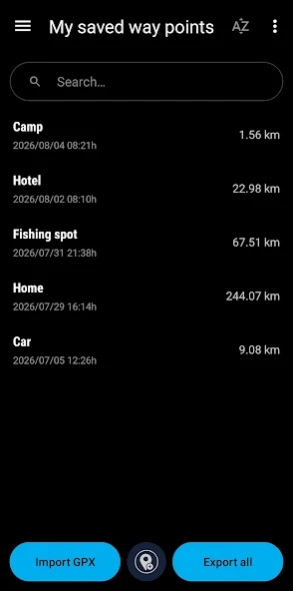


Navigate to your saved positions using GPS and compass. No internet required.
Never lose your way outdoors with GPS Compass Navigator. Whether you are traveling, hiking, fishing, camping, or exploring a new city, easily save important locations and navigate back safely with a precise guiding arrow.
Easily save your parked car, campsite, wilderness shelter, hotel, or favorite fishing spot. Designed for maximum reliability and simplicity, GPS Compass Navigator works 100% offline and is fully functional even on Android devices without a compass sensor.
🌟 Key Features
• Smart Compass: Accurate navigation with a precise guiding arrow.
• Instant Save: Mark your current location or campsite with one tap.
• Map Integration: Add coordinates directly from the interactive map view.
• Voice Guidance: Step-by-step voice navigation to saved waypoints.
• Route Recorder: Save your paths, follow tracks, or backtrack safely.
• Live Sharing: Share your real-time location with family and friends.
• GPX Support: Easy import and export of GPX files for outdoor tracks.
• Route Planner: Plan and customize your outdoor routes before you head out.
• Area Calculator: Easily measure land areas and distances directly on the map.
• Star Map: Navigate and find your orientation using the stars and night sky.
• Sonar View: Specialized radar-style display for tracking waypoints around you.
• Lock Screen: Navigation support keeps you on track without draining battery.
• Sun & Moon Info: Track sunrise, sunset, and celestial positions in real time.
• External Maps: Open your saved waypoints in other navigation apps.
• HUD Mode: Head-Up Display for safer navigation at night.
🧭 Advanced Navigation Data
Get detailed, real-time statistics on a single clean dashboard:
• Position: Current address, GPS coordinates, and GPS altitude.
• Metrics: Distance to destination, current speed, and Estimated Time of Arrival (ETA).
• Precision: Real-time GPS accuracy and magnetic field strength.
• Visuals: Clear route visualization and trip computer statistics.
• Formats: Supports Decimal, DMS, MGRS, and Google Plus Code coordinates.
🌲 Built for Wilderness & Adventures
• Offline First: All core navigation features work completely without internet.
• Universal Compatibility: Full support for devices without a magnetometer sensor.
• Smart Car Mode: Accurate bearing in vehicles when compass sensors are unreliable.
• Power Saving: Optimized battery consumption for long wilderness trips.
• Flexible Units: Full support for both metric and imperial systems.
• Calibration: Use the built-in sun position feature to verify compass accuracy.
⚠️ Important Note for Devices Without Compass
If your device does not have a compass (magnetometer) sensor, the navigation arrow will update seamlessly only while you are moving. For the best accuracy, keep the top of your device pointed in your direction of travel.
About GPS Compass Navigator
The company that develops GPS Compass Navigator is Evgeni Ganchev. The latest version released by its developer is 2.21.75. This app was rated by 2 users of our site and has an average rating of 4.5.
To install GPS Compass Navigator on your Android device, just click the green Continue To App button above to start the installation process. The app is listed on our website since 2026-09-29 and was downloaded 465 times. We have already checked if the download link is safe, however for your own protection we recommend that you scan the downloaded app with your antivirus. Your antivirus may detect the GPS Compass Navigator as malware as malware if the download link to com.evo.gpscompassnavigator is broken.
How to install GPS Compass Navigator on your Android device:
- Click on the Continue To App button on our website. This will redirect you to Google Play.
- Once the GPS Compass Navigator is shown in the Google Play listing of your Android device, you can start its download and installation. Tap on the Install button located below the search bar and to the right of the app icon.
- A pop-up window with the permissions required by GPS Compass Navigator will be shown. Click on Accept to continue the process.
- GPS Compass Navigator will be downloaded onto your device, displaying a progress. Once the download completes, the installation will start and you'll get a notification after the installation is finished.
Program Details
System requirements
Download information
Pricing
Version History
version 2.21.72
posted on 2026-09-29
Show saved points on the map
Double back to return to compass mode
Better localization
version 2.21.75
posted on 2026-09-29
Stability improvements
version 2.21.71
posted on 2026-09-22
Remaining battery time in statistics
Landscape view improvements
version 2.21.61
posted on 2026-09-17
Stability improvements
Track autosave feature
Planets in sky map
version 2.21.46
posted on 2026-08-21
UI/UX Improvements
Route Planner
Star Map
Sonar
Area Calculator
GPX bulk export/import
Google Plus code coordinates
UTM coordinate system
12/24 time format setting
Landscape view in car mode
Nautical miles
Track info in track list
Add new point support for different coordinate systems
Languages added: Hindi, Urdu, Italian and Bengali
version 2.21.25
posted on 2026-08-09
UI/UX Improvements
Route Planner
Star Map
Sonar
Area Calculator
GPX bulk export/import
Google Plus code coordinates
12/24 time format setting
Landscape view in car mode
version 2.20.35
posted on 2026-07-29
Bug fixes
version 2.20.34
posted on 2025-07-02
version 2.20.16
posted on 2023-07-20
🇺🇦 Ukrainian language added
version 2.20.19
posted on 2023-07-20
Fixed some bugs and performance improvements
